LDAP
Let directory users sign in with their own password, and give them roles through their directory groups
- How it works
- Settings
- Groups
- Mapping to roles
- Testing the connection
- Active Directory example
- OpenLDAP example
- Common pitfalls
How it works
AnsibleForms connects to the directory with a bind account, searches the user, and then binds as that user to check the password:
- The user signs in with username and password. When no local user has that name, LDAP is tried.
- AnsibleForms binds with the Bind User Dn, and searches Search Base for an entry whose Username Attribute equals the username.
- It binds as the entry that was found, with the password that was typed.
- The groups are read from the entry (or from a group search), filtered, and prefixed with
ldap/.
A username in UPN form (jdoe@example.com) that finds no user is retried once with the part before the @, so users can sign in with either form even when the Username Attribute holds the short name. A wrong password is never retried.
One set of settings serves Active Directory, OpenLDAP and others, and only one directory can be configured.
Settings
The settings are under Access > LDAP; they are greyed out until Enable LDAP is on.
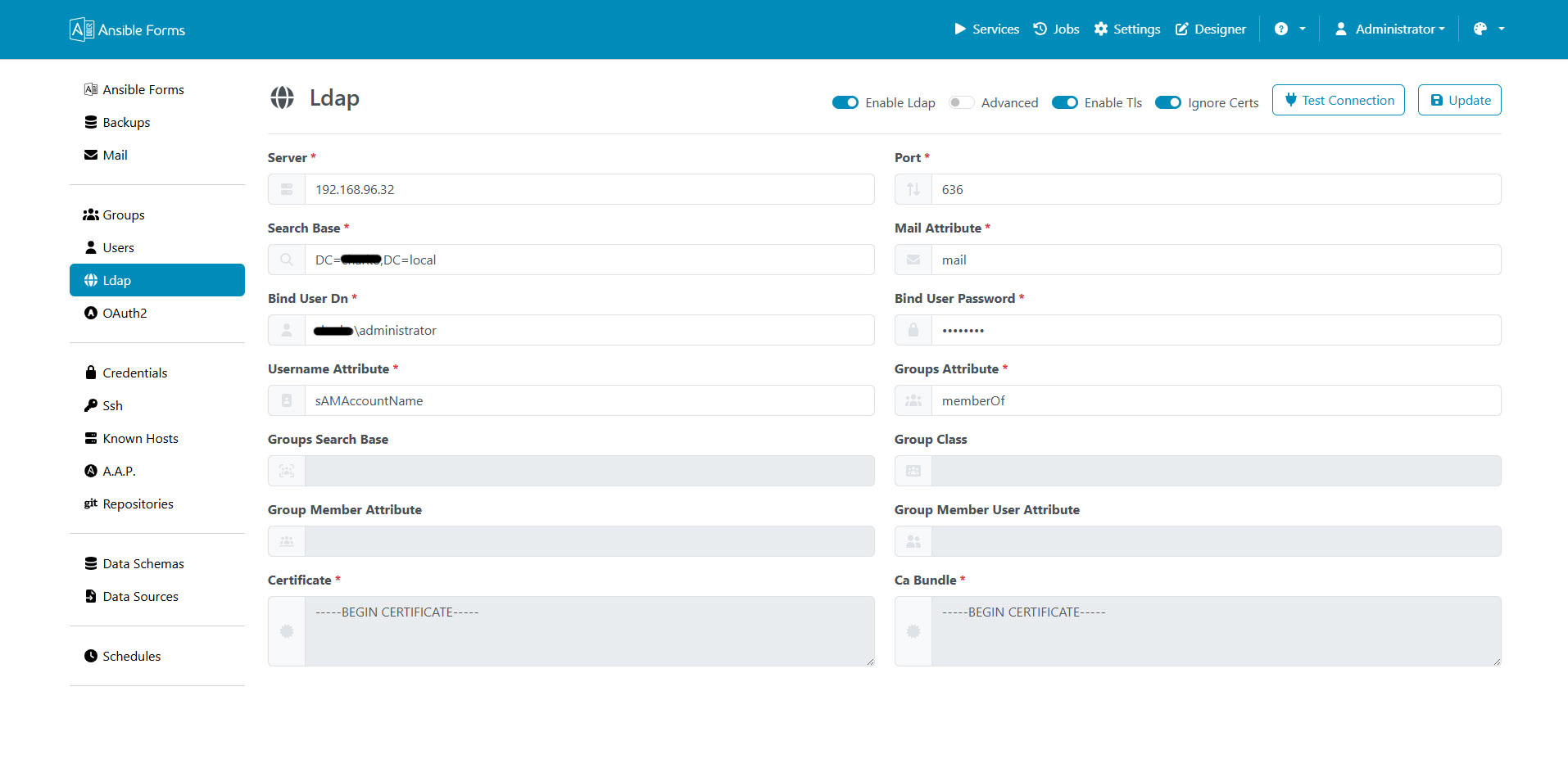
| Setting | Default | Meaning |
|---|---|---|
| Enable LDAP | off | Turns LDAP login on. |
| Server | Host name or IP address of the directory server. | |
| Port | 389 | 389 for plain LDAP, 636 for LDAPS. Switching Enable TLS changes one into the other. |
| Enable TLS | off | Connect with LDAPS (ldaps://). StartTLS on port 389 is not supported. |
| Ignore Certs | on | Skip the validation of the server certificate. Shown only with Enable TLS. |
| Certificate | The server certificate, in PEM. Required when TLS is on and Ignore Certs is off. | |
| Ca Bundle | The CA certificate(s) that signed the server certificate, in PEM. Required in the same case. | |
| Search Base | DN where the user search starts, e.g. OU=Users,DC=example,DC=com. Subtrees are searched too. | |
| Mail Attribute | Attribute holding the email address, usually mail. | |
| Bind User Dn | DN of the service account used to search the directory. | |
| Bind User Password | Its password, stored encrypted. | |
| Username Attribute | sAMAccountName | Attribute matched against the login name: sAMAccountName in AD, uid in OpenLDAP. |
| Groups Attribute | memberOf | Attribute of the user entry that holds the groups, or groups with a group search. |
| Groups Search Base | DN where the group search starts. | |
| Group Class | objectClass of the groups, e.g. group, groupOfNames or posixGroup. | |
| Group Member Attribute | member | Attribute of a group that lists its members, e.g. member, uniqueMember or memberUid. |
| Group Member User Attribute | dn | Attribute of the user that those member values hold, e.g. dn or uid. |
| Group Filter | Regular expression; only the groups whose name matches are kept. Empty keeps every group. |
The defaults of the last three group fields apply only when the group search is used, see the next section.
The bind password is encrypted with ENCRYPTION_SECRET. When that secret changes, the password can no longer be decrypted: enter it again.
Groups
The groups come from one of two places, and the Groups Attribute decides which one is used:
- An attribute of the user entry, usually
memberOf. This is the common setup for Active Directory, and for OpenLDAP with thememberofoverlay. - A group search, for directories without
memberOf. It runs only when Groups Search Base and Group Class are both set: AnsibleForms then searches for groups of that class whose Group Member Attribute holds the user’s Group Member User Attribute, and stores the result in the attributegroups. Set Groups Attribute togroupsto use it.
With Groups Attribute
memberOf, a configured group search runs but its result is not used for the roles.
Each group is a DN, and AnsibleForms keeps its first CN: CN=AF-Admins,OU=Groups,DC=example,DC=com becomes AF-Admins. The Group Filter is then applied to that name, and the remaining groups get the ldap/ prefix: ldap/AF-Admins.
In large directories the filter keeps tokens and jobs small; an invalid regular expression keeps all groups and is logged.
Mapping to roles
In config.yaml, an LDAP group is ldap/<group CN> and an LDAP user is ldap/<username>, both case sensitive:
roles:
  - name: admin
    groups:
      - local/admins
      - ldap/AF-Admins
  - name: operator
    groups:
      - ldap/AF-Operators
    users:
      - ldap/jdoe
The username is the value of the Username Attribute as the directory returns it, not as the user typed it. See Roles for the role options.
Testing the connection
Test Connection asks for a test username and password, and tries a login with the settings on the screen, saved or not. On success it shows the user’s directory entry, which tells you the exact attribute names and group DNs to use.
A test user that does not exist still reports success: the connection and the bind account work, only the user is not found. Typical errors:
| Message | Cause |
|---|---|
Bad server or port (connection failed) | The host name does not resolve or the port is not reachable. |
Wrong binding credentials | The Bind User Dn or Bind User Password is wrong. |
Unable to verify the certificate | The server certificate is not signed by the Ca Bundle. |
Certificate is not valid | The Certificate or Ca Bundle field does not hold a valid PEM certificate. |
Active Directory example
This example connects to a domain controller over LDAPS and keeps only the groups whose name starts with AF-:
| Setting | Value |
|---|---|
| Server | dc01.example.com |
| Port | 636 |
| Enable TLS | on |
| Ignore Certs | off, with the domain controller certificate and the CA chain of the enterprise CA |
| Search Base | OU=Users,DC=example,DC=com |
| Mail Attribute | mail |
| Bind User Dn | CN=svc-ansibleforms,OU=Service Accounts,DC=example,DC=com |
| Username Attribute | sAMAccountName |
| Groups Attribute | memberOf |
| Group Filter | ^AF- |
Members of CN=AF-Operators,… match roles with ldap/AF-Operators, and sign in as jdoe or jdoe@example.com.
OpenLDAP example
This example uses a group search on groupOfNames entries, so it works without the memberof overlay:
| Setting | Value |
|---|---|
| Server | ldap.example.com |
| Port | 636 |
| Enable TLS | on |
| Search Base | ou=people,dc=example,dc=com |
| Mail Attribute | mail |
| Bind User Dn | cn=readonly,dc=example,dc=com |
| Username Attribute | uid |
| Groups Attribute | groups |
| Groups Search Base | ou=groups,dc=example,dc=com |
| Group Class | groupOfNames |
| Group Member Attribute | member |
| Group Member User Attribute | dn |
A user listed in cn=af-admins,ou=groups,dc=example,dc=com gets the group ldap/af-admins. For posixGroup groups, use Group Member Attribute memberUid and Group Member User Attribute uid.
With the memberof overlay, leave the group search fields empty and set Groups Attribute to memberOf.
Common pitfalls
Most LDAP problems come down to one of these:
- A local user with the same name. Local users are checked first, so the directory is never asked for that name.
- No groups, or the wrong ones. The Groups Attribute must exist (
groupswith a group search);memberOfskips nesting. - Group names that do not match. Use
ldap/<CN>in the same case, and check the Group Filter keeps the group. - Group DNs that do not start with a CN. Only the first
CN=value is used as the group name, so every group DN must start withCN=(orcn=). - Certificates. TLS needs both certificate fields and a matching server name; Ignore Certs is for testing only.
- Settings that cannot be saved. When the LDAP settings come from the config seed, the LDAP page is read-only: change the seed file instead.
A failed login shows a generic message. The reason is logged by the server and kept in the audit log, and for Active Directory it is translated from the directory’s code, e.g. Wrong password, Account locked or Password expired.