Jobs
Follow, abort, relaunch, approve and delete the jobs your forms start
For everyone who launches forms: what a job is, where to find it, and who can see it.
What a job is
A job is one run of a form: AnsibleForms records it with its status, extravars and output as soon as the form is submitted.
Each job keeps:
- the form it ran and the user who launched it (with the user type, such as
localorldap); - its job type and status, and its start time and end time;
- its output, the extravars and credentials it ran with, and the field values entered in the form.
A multistep form creates one job for the form and one job per step. The steps are linked to the main job and are listed under it.
The same jobs can be launched, followed and managed through the REST API.
The Jobs page
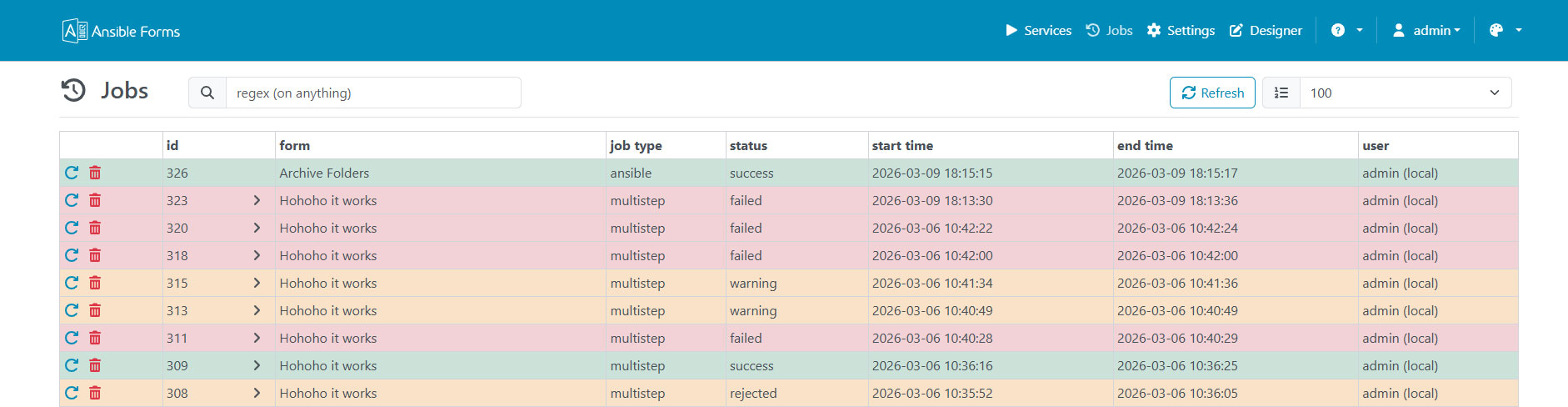
The Jobs link in the header opens the list of jobs, newest first. The page and its link are shown to users whose role sets the showJobs role option.
The left menu filters the list by status, with the number of jobs in each:
| Menu entry | Shows |
|---|---|
| All jobs | Every job in the list |
| Running | Jobs with status running |
| Waiting for approval | Jobs with status approve; the count turns red when one is waiting |
| Success | Jobs with status success |
| Failed | Jobs with status failed |
| Aborted | Jobs with status aborted |
Under Planned, the same menu links to Schedules (role option allowScheduledJobs) and to Stored Jobs (role option allowStoredJobs). The other statuses (warning, rejected, abandoned) appear under All jobs.
Above the table:
- Refresh reloads the list.
- The number next to it sets how many of the latest jobs are loaded:
100,200,500or1000. - Columns shows or hides the columns
id,form,job type,status,start time,end timeanduser.
Each column can be sorted and has its own filter field. A multistep job has an arrow in its id column that expands its steps.
The bell in the header counts the jobs waiting for your approval and opens the list on Waiting for approval.
Who sees which jobs
The jobs a user sees depend on their roles:
| User | Sees |
|---|---|
Admin (admin role) | Every job |
Role option showAllJobLogs | Every job |
| Any other user | Their own jobs, and every job waiting for approval |
Seeing a job does not grant every action on it: aborting is limited to the owner and admins, and relaunching to the owner, admins and showAllJobLogs users.
In this section
Each topic has a page of its own:
| Page | What it covers |
|---|---|
| Statuses and types | Every status a job can have, and the kinds of job |
| Following a job | Live output, extravars, filters and downloads |
| Job actions | Launch, abort, relaunch, approve or reject, and delete a job |
| Schedules | Run a form later or on a cron schedule, and manage every schedule |
| Stored jobs | Keep the data of a form to load it again later |
| Cleanup | Jobs cut off by a restart, and how long finished jobs are kept |