Jobs
Follow, abort, relaunch, approve and delete the jobs your forms start
For everyone who launches forms: what a job is, where to find it, and who can see it.
What a job is
A job is one run of a form: AnsibleForms records it with its status, extravars and output as soon as the form is submitted.
Each job keeps:
- the form it ran and the user who launched it (with the user type, such as
localorldap); - its job type and status, and its start time and end time;
- its output, the extravars and credentials it ran with, and the field values entered in the form.
A multistep form creates one job for the form and one job per step. The steps are linked to the main job and are listed under it.
The same jobs can be launched, followed and managed through the REST API.
The Jobs page
The Jobs link in the header opens the list of every job, newest first (/jobs/all). The page and its link are shown to users whose role sets the showJobs role option.
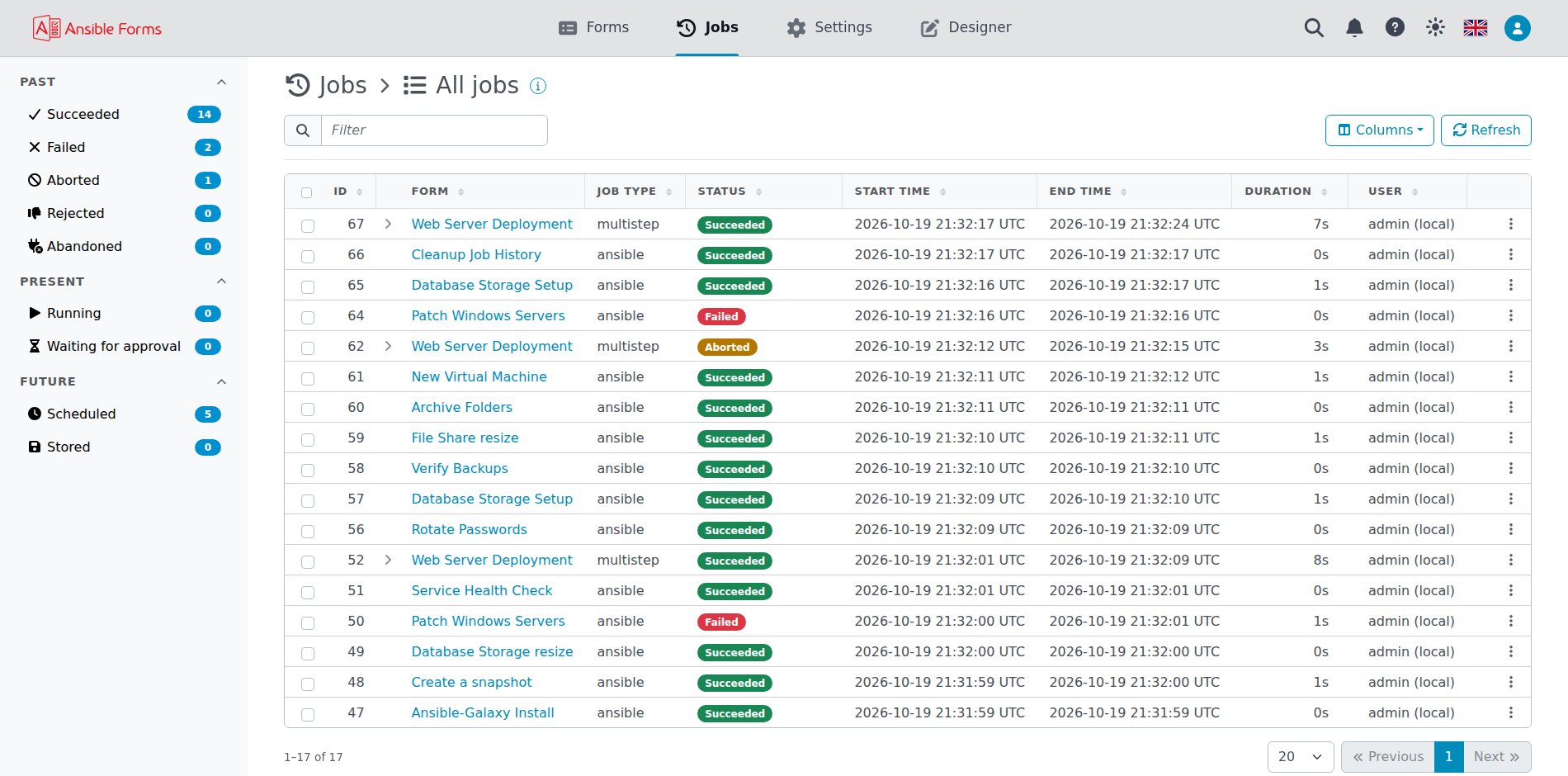
The left menu sorts the jobs in time, with the number of jobs in each entry; a status entry filters the list on that status:
| Section | Menu entry | Shows |
|---|---|---|
| Past | Succeeded | Jobs with status success |
| Failed | Jobs with status failed | |
| Aborted | Jobs with status aborted | |
| Rejected | Jobs with status rejected | |
| Abandoned | Jobs with status abandoned | |
| Present | Running | Jobs with status running |
| Waiting for approval | Jobs with status approve; the count turns orange when one is waiting | |
| Future | Scheduled | The Schedules page (role option allowScheduledJobs) |
| Stored | The Stored jobs page (role option allowStoredJobs) |
The menu has no entry for every job: the header’s Jobs link shows them all, warning jobs included.
Above the table, on the title line:
- the search box keeps the jobs whose shown columns hold the text (case-insensitive), or one of whose steps has it as its id or target;
- Delete (with the number of jobs ticked) deletes the jobs ticked in the first column together;
- Columns shows or hides the columns
id,form,job type,status,start time,end time,durationanduser; a running job’s duration counts up; - Refresh reloads the list.
The list loads the newest jobs, as many as the JOBS_LIST_SIZE setting says (Settings > System > General, Jobs tab, 1000 by default); its pages, search and filters cover those jobs.
Each column can be sorted and has its own filter field. A multistep job has an arrow just before its form that expands its steps; a click on the rest of a row opens the job.
The bell in the header counts the jobs waiting for your approval and opens the list on Waiting for approval. For the users who can see the runners, it also counts the runners waiting for approval, RTEs that asked to join, and opens Connections > Runners when only runners wait. With both waiting, it opens a menu, Jobs waiting for approval and Runners waiting for approval, each with its count.
Who sees which jobs
The jobs a user sees depend on their roles:
| User | Sees |
|---|---|
Admin (admin role) | Every job |
Role option showAllJobLogs | Every job |
Role option manageAllJobs (from 7.3.0) | Every job, and may abort, delete and relaunch it |
| Any other user | Their own jobs, and the jobs waiting for an approval that names one of their roles |
Up to 7.2, every user could open any job waiting for approval, its extravars and output included; from 7.3.0 only its owner and its approvers can. Seeing a job does not grant every action on it: aborting, deleting and relaunching another user’s job takes an admin or manageAllJobs, and showAllJobLogs only shows the jobs. Deleting also needs allowJobDeletion and relaunching allowJobRelaunch.
In this section
Each topic has a page of its own:
| Page | What it covers |
|---|---|
| Statuses and types | Every status a job can have, and the kinds of job |
| Following a job | Live output, extravars, filters and downloads |
| Job actions | Launch, abort, relaunch, approve or reject, and delete a job |
| Schedules | Run a form later or on a cron schedule, and manage every schedule |
| Stored jobs | Keep the data of a form to load it again later |
| Cleanup | Jobs cut off by a restart, and how long finished jobs are kept |